> ## Documentation Index
> Fetch the complete documentation index at: https://utoken-docs.yoostudio.ai/docs/llms.txt
> Use this file to discover all available pages before exploring further.
# Dify
> Guide to Integrating UToken with the Visual AI Application Development Platform
## Overview
**[Dify](https://dify.ai)** is an open-source LLM application development platform that provides visual orchestration, knowledge base, workflow, and API service capabilities, enabling you to rapidly build conversational assistants, Agents, knowledge base Q\&A, and other AI applications.
 With UToken, you can invoke 100+ mainstream models (Claude, OpenAI, Gemini, Qwen, DeepSeek, Kimi, etc.) within Dify using a single API Key, while benefiting from unified billing, automatic failover, and enterprise-grade reliability.
## Quick Integration
### 1. Navigate to Dify Model Provider Settings
1. Log in to the Dify platform, click your username in the top-right corner → **Settings**
2. Select **Model Provider** from the left-hand menu
3. Locate the **OpenAI-API-compatible** plugin in the list and click to install
With UToken, you can invoke 100+ mainstream models (Claude, OpenAI, Gemini, Qwen, DeepSeek, Kimi, etc.) within Dify using a single API Key, while benefiting from unified billing, automatic failover, and enterprise-grade reliability.
## Quick Integration
### 1. Navigate to Dify Model Provider Settings
1. Log in to the Dify platform, click your username in the top-right corner → **Settings**
2. Select **Model Provider** from the left-hand menu
3. Locate the **OpenAI-API-compatible** plugin in the list and click to install
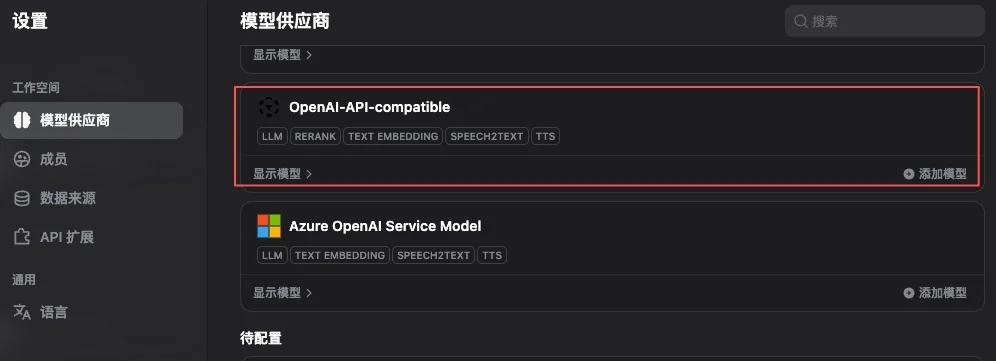 The **OpenAI-API-compatible** plugin supports multiple endpoint types including Chat, Embedding, TTS, and STT. UToken is fully compatible with all of them — a single plugin covers all models.
### 2. Add Model Configuration
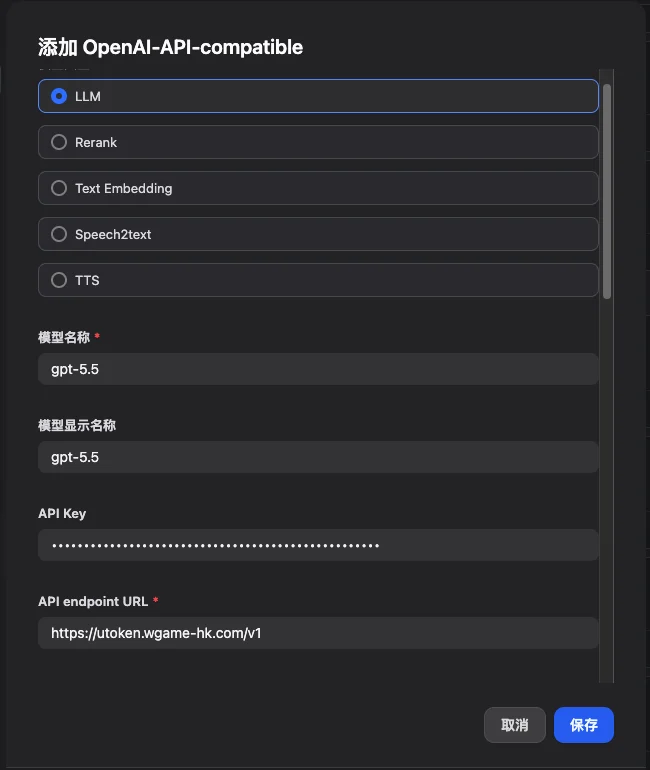
After installing the plugin, click **Add Model** and fill in the following three core parameters:
The **OpenAI-API-compatible** plugin supports multiple endpoint types including Chat, Embedding, TTS, and STT. UToken is fully compatible with all of them — a single plugin covers all models.
### 2. Add Model Configuration
After installing the plugin, click **Add Model** and fill in the following three core parameters:
 | Field | Value | Description |
| ------------------------------ | --------------------------------------------------------------------------- | -------------------------------------------------------------------------------------------------------------- |
| **Model Type** | LLM / Text Embedding / Speech2text, etc. | Select based on the endpoint type you are integrating |
| **Model Name** | e.g. `gpt-5.5`, `claude-opus-4-7`, `gemini-3.5-flash` | Must use the [canonical model name](https://utoken.yoostudio.ai/models); **arbitrary values are not accepted** |
| **Model Display Name** | e.g. `GPT-5.5`, `Claude Opus 4.7` | Display only; can be customized |
| **API Key** | Copied from the [UToken Console](https://utoken.yoostudio.ai/console/token) | Format: `sk-xxxxxxxx` |
| **API Endpoint URL** | `https://utoken.yoostudio.ai/v1` | Do not omit the trailing `/v1` |
| **Model Name in API Endpoint** | **Must be identical to "Model Name"** | Dify uses this value as the `model` parameter in the request body |
The **"Model Name"** and **"Model Name in API Endpoint"** must be **exactly identical**. Incorrect values (e.g., `Gemini 3.5 Flash` with spaces as a friendly name) will result in 404 / model not found errors.
### 3. Configure Context Length and Parameters
Dify defaults to `max_context = 4096`, which is **far below the actual capability** of most modern models. Configure the context length according to each model's specification:
| Model | Context Length |
| -------------------------------------------------- | -------------- |
| `claude-opus-4-7` / `gpt-5.5` / `gemini-3.5-flash` | 1,000,000 |
| `claude-sonnet-4-5` / `claude-haiku-4-5` | 200,000 |
| `kimi-k2.5` | 256,000 |
| `deepseek-v3-2-251201` | 128,000 |
For the full model context specifications, refer to the [Model Marketplace](https://utoken.yoostudio.ai/models).
## Core Features
### 1. Conversational Assistant
The simplest application type, ideal for customer service, knowledge Q\&A, and role-playing scenarios:
1. Create an application → Select the **Conversational Assistant** template
2. Configure the system prompt:
```text theme={null} theme={null}
You are an intelligent customer service assistant for UToken. Your responsibilities are:
- Answer user questions encountered during API integration
- Recommend models suitable for the user's use case
- Guide users to documentation or contact BD when uncertain
Maintain a friendly, professional, and concise tone.
```
3. Select **`gpt-5.5`** or **`claude-opus-4-7`** as the model
4. Recommended parameters: `temperature = 0.7`, `max_tokens = 2000`
### 2. Workflow Application
Orchestrate multiple steps into a DAG, supporting conditional branching, parallelism, and loops:
```mermaid theme={null} theme={null}
graph LR
A[User Input] --> B[Intent Recognition]
B --> C{Classify Type}
C -->|Q&A| D[Knowledge Base Retrieval]
C -->|Creation| E[Creative Generation]
C -->|Analysis| F[Data Analysis]
D --> G[Assemble Response]
E --> G
F --> G
G --> H[Output Result]
```
**Recommended node model selection:**
* Intent classification: `gemini-3.5-flash` (high throughput, low latency)
* Knowledge base retrieval / embedding: `text-embedding-3-large` or `gemini-embedding-001`
* Long-form summarization / reasoning: `claude-opus-4-7` (1M context, strong reasoning)
* Code generation: `gpt-5.5` or `qwen3-coder-plus`
### 3. Knowledge Base Q\&A (RAG)
1. **Create a Knowledge Base** → Upload documents (PDF / Word / Markdown / TXT, etc.)
2. **Select an embedding model**: `text-embedding-3-large` (OpenAI) is recommended
3. **Chunking strategy**: Automatic paragraph-based splitting, averaging 500 tokens per chunk
4. **Reference the knowledge base in your application**
5. **Configure retrieval parameters**:
* Top-K: 3–5
* Similarity threshold: 0.7
* **Reranking: enabled** (significantly improves retrieval relevance)
## Application Types and Configuration Examples
```yaml theme={null} theme={null}
Application Type: Conversational Assistant
Model: gpt-5.5
System Prompt: |
You are a professional AI customer service assistant responsible for:
- Answering user questions
- Providing product information
- Handling after-sales support
Maintain a friendly and professional demeanor.
temperature: 0.7
max_tokens: 2000
```
```yaml theme={null} theme={null}
Application Type: Workflow
Input: Upload document
Processing Pipeline:
1. Document parsing (Dify built-in Parser)
2. Long-form summarization (claude-opus-4-7, 1M context)
3. Structured key point extraction
4. Generate analysis report
Output: Markdown report
```
```yaml theme={null} theme={null}
Application Type: Conversational Assistant
Model: claude-opus-4-7
System Prompt: |
You are a professional coding assistant with expertise in:
- Code writing and optimization
- Debugging
- Architecture design
- Best practice recommendations
Provide clear, executable code solutions with concise explanations.
temperature: 0.3
```
## Advanced Features
### 1. Calling Dify Applications via API
A Dify application can itself be exposed as an HTTP service for external consumption. The following example demonstrates a conversational assistant:
```python theme={null} theme={null}
import requests
url = "https://your-dify-instance/v1/chat-messages"
headers = {
"Authorization": "Bearer YOUR_DIFY_APP_API_KEY",
"Content-Type": "application/json"
}
payload = {
"inputs": {},
"query": "Introduce UToken in one sentence",
"response_mode": "streaming",
"user": "user_123"
}
resp = requests.post(url, headers=headers, json=payload, stream=True)
for line in resp.iter_lines():
if line:
print(line.decode("utf-8"))
```
### 2. Multimodal (Image Input)
Models with vision capabilities (`gpt-5.5`, `claude-opus-4-7`, `gemini-3.5-flash`) can accept image inputs:
```python theme={null} theme={null}
{
"inputs": {
"image": "data:image/jpeg;base64,...",
"instruction": "Analyze the key information in this image"
},
"query": "Please describe the image in detail and provide business recommendations"
}
```
### 3. Batch Processing
For large-scale datasets (CSV imports, bulk document summarization, etc.), it is recommended to:
1. Use low-cost, high-speed models (`gemini-3.5-flash`, `gpt-5.4-mini`)
2. Set a concurrency limit on the Dify workflow to avoid saturating rate limits at once
3. Enable result caching to avoid redundant calls for identical inputs
## Model Selection Strategy
View UToken's scenario-based model recommendations: text generation, coding, fast response, long-context, image generation, and more.
### Cost Optimization: Development vs. Production
```yaml theme={null} theme={null}
Development Environment:
Model: gemini-3.5-flash # Low cost, fast iteration
max_tokens: 1000
temperature: 0.7
Production Environment:
Model: claude-opus-4-7 # Flagship intelligence, stable and reliable
max_tokens: 2000
temperature: 0.3
fallback: gpt-5.5 # Automatic failover via UToken
```
UToken supports **automatic failover** at the platform level: if a provider becomes unavailable, the platform automatically routes to an equivalent model without requiring manual fallback configuration on the Dify side.
## Best Practices
### 1. Structured Prompting
```text theme={null} theme={null}
# Role Definition
You are a professional [specific role]
# Task Description
Please help the user complete [specific task]
# Output Format
1. Summary (<= 100 words)
2. Detailed analysis (itemized)
3. Actionable recommendations
# Constraints
- Be accurate and objective; explicitly state any uncertainty
- Keep within 500 words
- Use English
```
### 2. Workflow Design
```mermaid theme={null} theme={null}
graph TD
A[User Input] --> B[Input Validation]
B --> C[Intent Classification]
C --> D{Select Path}
D -->|Simple Q&A| E[Quick Response
| Field | Value | Description |
| ------------------------------ | --------------------------------------------------------------------------- | -------------------------------------------------------------------------------------------------------------- |
| **Model Type** | LLM / Text Embedding / Speech2text, etc. | Select based on the endpoint type you are integrating |
| **Model Name** | e.g. `gpt-5.5`, `claude-opus-4-7`, `gemini-3.5-flash` | Must use the [canonical model name](https://utoken.yoostudio.ai/models); **arbitrary values are not accepted** |
| **Model Display Name** | e.g. `GPT-5.5`, `Claude Opus 4.7` | Display only; can be customized |
| **API Key** | Copied from the [UToken Console](https://utoken.yoostudio.ai/console/token) | Format: `sk-xxxxxxxx` |
| **API Endpoint URL** | `https://utoken.yoostudio.ai/v1` | Do not omit the trailing `/v1` |
| **Model Name in API Endpoint** | **Must be identical to "Model Name"** | Dify uses this value as the `model` parameter in the request body |
The **"Model Name"** and **"Model Name in API Endpoint"** must be **exactly identical**. Incorrect values (e.g., `Gemini 3.5 Flash` with spaces as a friendly name) will result in 404 / model not found errors.
### 3. Configure Context Length and Parameters
Dify defaults to `max_context = 4096`, which is **far below the actual capability** of most modern models. Configure the context length according to each model's specification:
| Model | Context Length |
| -------------------------------------------------- | -------------- |
| `claude-opus-4-7` / `gpt-5.5` / `gemini-3.5-flash` | 1,000,000 |
| `claude-sonnet-4-5` / `claude-haiku-4-5` | 200,000 |
| `kimi-k2.5` | 256,000 |
| `deepseek-v3-2-251201` | 128,000 |
For the full model context specifications, refer to the [Model Marketplace](https://utoken.yoostudio.ai/models).
## Core Features
### 1. Conversational Assistant
The simplest application type, ideal for customer service, knowledge Q\&A, and role-playing scenarios:
1. Create an application → Select the **Conversational Assistant** template
2. Configure the system prompt:
```text theme={null} theme={null}
You are an intelligent customer service assistant for UToken. Your responsibilities are:
- Answer user questions encountered during API integration
- Recommend models suitable for the user's use case
- Guide users to documentation or contact BD when uncertain
Maintain a friendly, professional, and concise tone.
```
3. Select **`gpt-5.5`** or **`claude-opus-4-7`** as the model
4. Recommended parameters: `temperature = 0.7`, `max_tokens = 2000`
### 2. Workflow Application
Orchestrate multiple steps into a DAG, supporting conditional branching, parallelism, and loops:
```mermaid theme={null} theme={null}
graph LR
A[User Input] --> B[Intent Recognition]
B --> C{Classify Type}
C -->|Q&A| D[Knowledge Base Retrieval]
C -->|Creation| E[Creative Generation]
C -->|Analysis| F[Data Analysis]
D --> G[Assemble Response]
E --> G
F --> G
G --> H[Output Result]
```
**Recommended node model selection:**
* Intent classification: `gemini-3.5-flash` (high throughput, low latency)
* Knowledge base retrieval / embedding: `text-embedding-3-large` or `gemini-embedding-001`
* Long-form summarization / reasoning: `claude-opus-4-7` (1M context, strong reasoning)
* Code generation: `gpt-5.5` or `qwen3-coder-plus`
### 3. Knowledge Base Q\&A (RAG)
1. **Create a Knowledge Base** → Upload documents (PDF / Word / Markdown / TXT, etc.)
2. **Select an embedding model**: `text-embedding-3-large` (OpenAI) is recommended
3. **Chunking strategy**: Automatic paragraph-based splitting, averaging 500 tokens per chunk
4. **Reference the knowledge base in your application**
5. **Configure retrieval parameters**:
* Top-K: 3–5
* Similarity threshold: 0.7
* **Reranking: enabled** (significantly improves retrieval relevance)
## Application Types and Configuration Examples
```yaml theme={null} theme={null}
Application Type: Conversational Assistant
Model: gpt-5.5
System Prompt: |
You are a professional AI customer service assistant responsible for:
- Answering user questions
- Providing product information
- Handling after-sales support
Maintain a friendly and professional demeanor.
temperature: 0.7
max_tokens: 2000
```
```yaml theme={null} theme={null}
Application Type: Workflow
Input: Upload document
Processing Pipeline:
1. Document parsing (Dify built-in Parser)
2. Long-form summarization (claude-opus-4-7, 1M context)
3. Structured key point extraction
4. Generate analysis report
Output: Markdown report
```
```yaml theme={null} theme={null}
Application Type: Conversational Assistant
Model: claude-opus-4-7
System Prompt: |
You are a professional coding assistant with expertise in:
- Code writing and optimization
- Debugging
- Architecture design
- Best practice recommendations
Provide clear, executable code solutions with concise explanations.
temperature: 0.3
```
## Advanced Features
### 1. Calling Dify Applications via API
A Dify application can itself be exposed as an HTTP service for external consumption. The following example demonstrates a conversational assistant:
```python theme={null} theme={null}
import requests
url = "https://your-dify-instance/v1/chat-messages"
headers = {
"Authorization": "Bearer YOUR_DIFY_APP_API_KEY",
"Content-Type": "application/json"
}
payload = {
"inputs": {},
"query": "Introduce UToken in one sentence",
"response_mode": "streaming",
"user": "user_123"
}
resp = requests.post(url, headers=headers, json=payload, stream=True)
for line in resp.iter_lines():
if line:
print(line.decode("utf-8"))
```
### 2. Multimodal (Image Input)
Models with vision capabilities (`gpt-5.5`, `claude-opus-4-7`, `gemini-3.5-flash`) can accept image inputs:
```python theme={null} theme={null}
{
"inputs": {
"image": "data:image/jpeg;base64,...",
"instruction": "Analyze the key information in this image"
},
"query": "Please describe the image in detail and provide business recommendations"
}
```
### 3. Batch Processing
For large-scale datasets (CSV imports, bulk document summarization, etc.), it is recommended to:
1. Use low-cost, high-speed models (`gemini-3.5-flash`, `gpt-5.4-mini`)
2. Set a concurrency limit on the Dify workflow to avoid saturating rate limits at once
3. Enable result caching to avoid redundant calls for identical inputs
## Model Selection Strategy
View UToken's scenario-based model recommendations: text generation, coding, fast response, long-context, image generation, and more.
### Cost Optimization: Development vs. Production
```yaml theme={null} theme={null}
Development Environment:
Model: gemini-3.5-flash # Low cost, fast iteration
max_tokens: 1000
temperature: 0.7
Production Environment:
Model: claude-opus-4-7 # Flagship intelligence, stable and reliable
max_tokens: 2000
temperature: 0.3
fallback: gpt-5.5 # Automatic failover via UToken
```
UToken supports **automatic failover** at the platform level: if a provider becomes unavailable, the platform automatically routes to an equivalent model without requiring manual fallback configuration on the Dify side.
## Best Practices
### 1. Structured Prompting
```text theme={null} theme={null}
# Role Definition
You are a professional [specific role]
# Task Description
Please help the user complete [specific task]
# Output Format
1. Summary (<= 100 words)
2. Detailed analysis (itemized)
3. Actionable recommendations
# Constraints
- Be accurate and objective; explicitly state any uncertainty
- Keep within 500 words
- Use English
```
### 2. Workflow Design
```mermaid theme={null} theme={null}
graph TD
A[User Input] --> B[Input Validation]
B --> C[Intent Classification]
C --> D{Select Path}
D -->|Simple Q&A| E[Quick Response
gemini-3.5-flash]
D -->|Complex Analysis| F[Deep Reasoning
claude-opus-4-7]
D -->|Requires Retrieval| G[Knowledge Base Retrieval
+ Reranking]
E --> H[Output]
F --> H
G --> I[Integrate Retrieval Results
gpt-5.5] --> H
```
### 3. Monitoring and Optimization
Review regularly:
* ✅ User satisfaction feedback (collect thumbs up/down)
* ⏱️ P95 response time
* 💰 Per-call cost and daily/monthly usage trends
* ❌ Error rate and failure cause distribution
The UToken Console provides real-time usage and cost statistics broken down by Key and model dimension for direct reconciliation.
### 4. Version Management
* Export Dify application configurations (JSON / YAML) regularly for backup
* Test new versions before publishing; use gradual rollout (canary deployment) to incrementally shift traffic
* Retain at least N-1 versions for rapid rollback
## Troubleshooting
### Common Issues
**401 / Invalid API Key on model invocation**
* Verify the API Key is correct (re-copy from the [Console](https://utoken.yoostudio.ai/console/token))
* Confirm the account balance is sufficient
* Check that the baseURL is `https://utoken.yoostudio.ai/v1` (including the trailing `/v1`)
**404 / Model Not Found**
* Verify the model name uses the [canonical name](https://utoken.yoostudio.ai/models) (e.g., `gpt-5.5` not `GPT-5.5`)
* Confirm that "Model Name" and "Model Name in API Endpoint" are exactly identical
**Slow Response / Streaming Output Stalling**
* Prefer Flash / Mini tier models
* Reduce the `max_tokens` limit
* Enable Dify's result caching
### Performance Optimization Reference
```yaml theme={null} theme={null}
Cache Configuration:
Enabled: true
TTL: 3600s
Cache Condition: identical input
Concurrency Control:
Max Concurrency: 10
Queue Size: 100
Timeout: 30s
Resource Limits:
Memory: 2GB
CPU: 80%
```
## Deployment Recommendations
### Production Environment (Self-hosted Dify) Docker Compose Example
```yaml theme={null} theme={null}
version: '3.8'
services:
dify-api:
image: langgenius/dify-api:latest
environment:
- SECRET_KEY=your-secret-key
- DB_HOST=postgres
- REDIS_HOST=redis
- OPENAI_API_KEY=sk-your-UToken-key
- OPENAI_API_BASE=https://utoken.yoostudio.ai/v1
depends_on:
- postgres
- redis
dify-web:
image: langgenius/dify-web:latest
ports:
- "3000:3000"
depends_on:
- dify-api
postgres:
image: postgres:14
environment:
- POSTGRES_DB=dify
- POSTGRES_USER=dify
- POSTGRES_PASSWORD=password
redis:
image: redis:alpine
```
### Security Configuration
* Store API Keys in environment variables or a Secret Manager — **do not hardcode them in the Dify application configuration**
* Enable HTTPS with a reverse proxy (Nginx / Caddy / Traefik) in front
* Enable SSO / two-factor authentication for the Dify admin panel
* Regularly update base images and dependencies
### Health Check
```python theme={null} theme={null}
import requests, time
def monitor_dify():
try:
r = requests.get("http://dify-api:5001/health", timeout=5)
if r.status_code == 200:
print("Dify is running normally")
else:
print(f"Anomaly detected, status code: {r.status_code}")
except Exception as e:
print(f"Monitoring failed: {e}")
while True:
monitor_dify()
time.sleep(60)
```
## Metrics and Reconciliation
After integration, return to the [UToken Console](https://utoken.yoostudio.ai/console/token) to view call volume, token consumption, cost breakdown, and per-model success rate metrics:
* Model names must use [canonical names](https://utoken.yoostudio.ai/models) (lowercase, exactly matching the official model ID)
* Unified API endpoint: `https://utoken.yoostudio.ai/v1`
* It is recommended to first validate the entire workflow with low-cost models such as `gemini-3.5-flash` in a test environment before switching to flagship models like `claude-opus-4-7` / `gpt-5.5` for production