
Overview
Dify is an open-source LLM application development platform that provides visual orchestration, knowledge base, workflow, and API service capabilities, enabling you to rapidly build conversational assistants, Agents, knowledge base Q&A, and other AI applications.
Quick Integration
1. Navigate to Dify Model Provider Settings
- Log in to the Dify platform, click your username in the top-right corner → Settings
- Select Model Provider from the left-hand menu
- Locate the OpenAI-API-compatible plugin in the list and click to install
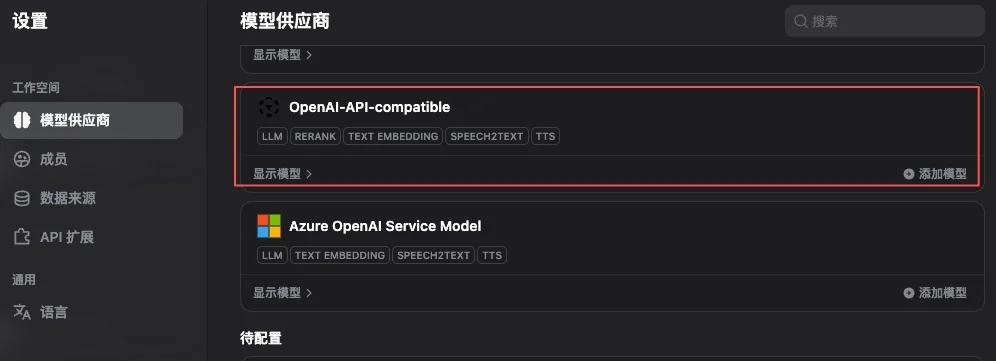
The OpenAI-API-compatible plugin supports multiple endpoint types including Chat, Embedding, TTS, and STT. UToken is fully compatible with all of them — a single plugin covers all models.
2. Add Model Configuration
After installing the plugin, click Add Model and fill in the following three core parameters: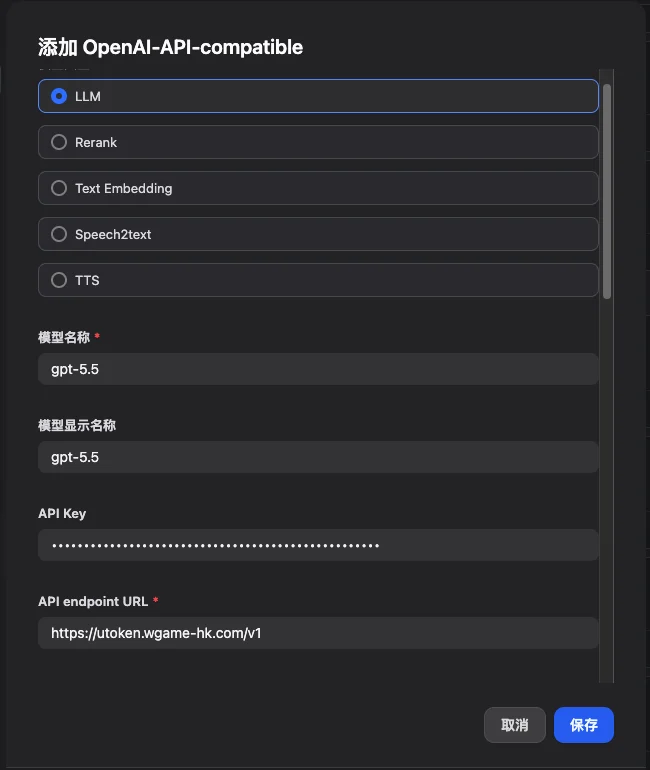
| Field | Value | Description |
|---|---|---|
| Model Type | LLM / Text Embedding / Speech2text, etc. | Select based on the endpoint type you are integrating |
| Model Name | e.g. gpt-5.5, claude-opus-4-7, gemini-3.5-flash | Must use the canonical model name; arbitrary values are not accepted |
| Model Display Name | e.g. GPT-5.5, Claude Opus 4.7 | Display only; can be customized |
| API Key | Copied from the UToken Console | Format: sk-xxxxxxxx |
| API Endpoint URL | https://utoken.yoostudio.ai/v1 | Do not omit the trailing /v1 |
| Model Name in API Endpoint | Must be identical to “Model Name” | Dify uses this value as the model parameter in the request body |
3. Configure Context Length and Parameters
Dify defaults tomax_context = 4096, which is far below the actual capability of most modern models. Configure the context length according to each model’s specification:
| Model | Context Length |
|---|---|
claude-opus-4-7 / gpt-5.5 / gemini-3.5-flash | 1,000,000 |
claude-sonnet-4-5 / claude-haiku-4-5 | 200,000 |
kimi-k2.5 | 256,000 |
deepseek-v3-2-251201 | 128,000 |
Core Features
1. Conversational Assistant
The simplest application type, ideal for customer service, knowledge Q&A, and role-playing scenarios:- Create an application → Select the Conversational Assistant template
- Configure the system prompt:
- Select
gpt-5.5orclaude-opus-4-7as the model - Recommended parameters:
temperature = 0.7,max_tokens = 2000
2. Workflow Application
Orchestrate multiple steps into a DAG, supporting conditional branching, parallelism, and loops: Recommended node model selection:- Intent classification:
gemini-3.5-flash(high throughput, low latency) - Knowledge base retrieval / embedding:
text-embedding-3-largeorgemini-embedding-001 - Long-form summarization / reasoning:
claude-opus-4-7(1M context, strong reasoning) - Code generation:
gpt-5.5orqwen3-coder-plus
3. Knowledge Base Q&A (RAG)
- Create a Knowledge Base → Upload documents (PDF / Word / Markdown / TXT, etc.)
- Select an embedding model:
text-embedding-3-large(OpenAI) is recommended - Chunking strategy: Automatic paragraph-based splitting, averaging 500 tokens per chunk
- Reference the knowledge base in your application
- Configure retrieval parameters:
- Top-K: 3–5
- Similarity threshold: 0.7
- Reranking: enabled (significantly improves retrieval relevance)
Application Types and Configuration Examples
- Intelligent Customer Service
- Document Analysis
- Coding Assistant
Advanced Features
1. Calling Dify Applications via API
A Dify application can itself be exposed as an HTTP service for external consumption. The following example demonstrates a conversational assistant:2. Multimodal (Image Input)
Models with vision capabilities (gpt-5.5, claude-opus-4-7, gemini-3.5-flash) can accept image inputs:
3. Batch Processing
For large-scale datasets (CSV imports, bulk document summarization, etc.), it is recommended to:- Use low-cost, high-speed models (
gemini-3.5-flash,gpt-5.4-mini) - Set a concurrency limit on the Dify workflow to avoid saturating rate limits at once
- Enable result caching to avoid redundant calls for identical inputs
Model Selection Strategy
Full Scenario-Based Model Recommendations
View UToken’s scenario-based model recommendations: text generation, coding, fast response, long-context, image generation, and more.
Cost Optimization: Development vs. Production
UToken supports automatic failover at the platform level: if a provider becomes unavailable, the platform automatically routes to an equivalent model without requiring manual fallback configuration on the Dify side.
Best Practices
1. Structured Prompting
2. Workflow Design
3. Monitoring and Optimization
Review regularly:- ✅ User satisfaction feedback (collect thumbs up/down)
- ⏱️ P95 response time
- 💰 Per-call cost and daily/monthly usage trends
- ❌ Error rate and failure cause distribution
4. Version Management
- Export Dify application configurations (JSON / YAML) regularly for backup
- Test new versions before publishing; use gradual rollout (canary deployment) to incrementally shift traffic
- Retain at least N-1 versions for rapid rollback
Troubleshooting
Common Issues
401 / Invalid API Key on model invocation- Verify the API Key is correct (re-copy from the Console)
- Confirm the account balance is sufficient
- Check that the baseURL is
https://utoken.yoostudio.ai/v1(including the trailing/v1)
- Verify the model name uses the canonical name (e.g.,
gpt-5.5notGPT-5.5) - Confirm that “Model Name” and “Model Name in API Endpoint” are exactly identical
- Prefer Flash / Mini tier models
- Reduce the
max_tokenslimit - Enable Dify’s result caching
Performance Optimization Reference
Deployment Recommendations
Production Environment (Self-hosted Dify) Docker Compose Example
Security Configuration
- Store API Keys in environment variables or a Secret Manager — do not hardcode them in the Dify application configuration
- Enable HTTPS with a reverse proxy (Nginx / Caddy / Traefik) in front
- Enable SSO / two-factor authentication for the Dify admin panel
- Regularly update base images and dependencies