Overview

WorkBuddy is Tencent’s all-scenario workplace AI agent desktop workstation. Users simply describe their requirements in natural language, and WorkBuddy autonomously plans and executes tasks, delivering ready-to-use artifacts such as documents, spreadsheets, presentations, and research reports. Unlike traditional AI chat tools, WorkBuddy goes beyond answering questions — it can:
  • Autonomously decompose complex tasks
  • Operate local files
  • Invoke Skills
  • Call MCP services
  • Connect to enterprise knowledge bases and office systems
  • Execute multi-step workflows and deliver results
With UToken, you can use a single unified API Key within WorkBuddy to invoke 100+ mainstream models — including Claude, GPT, Gemini, Qwen, DeepSeek, Kimi, and GLM — while benefiting from unified billing, automatic failover, and enterprise-grade reliability.

Quick Integration

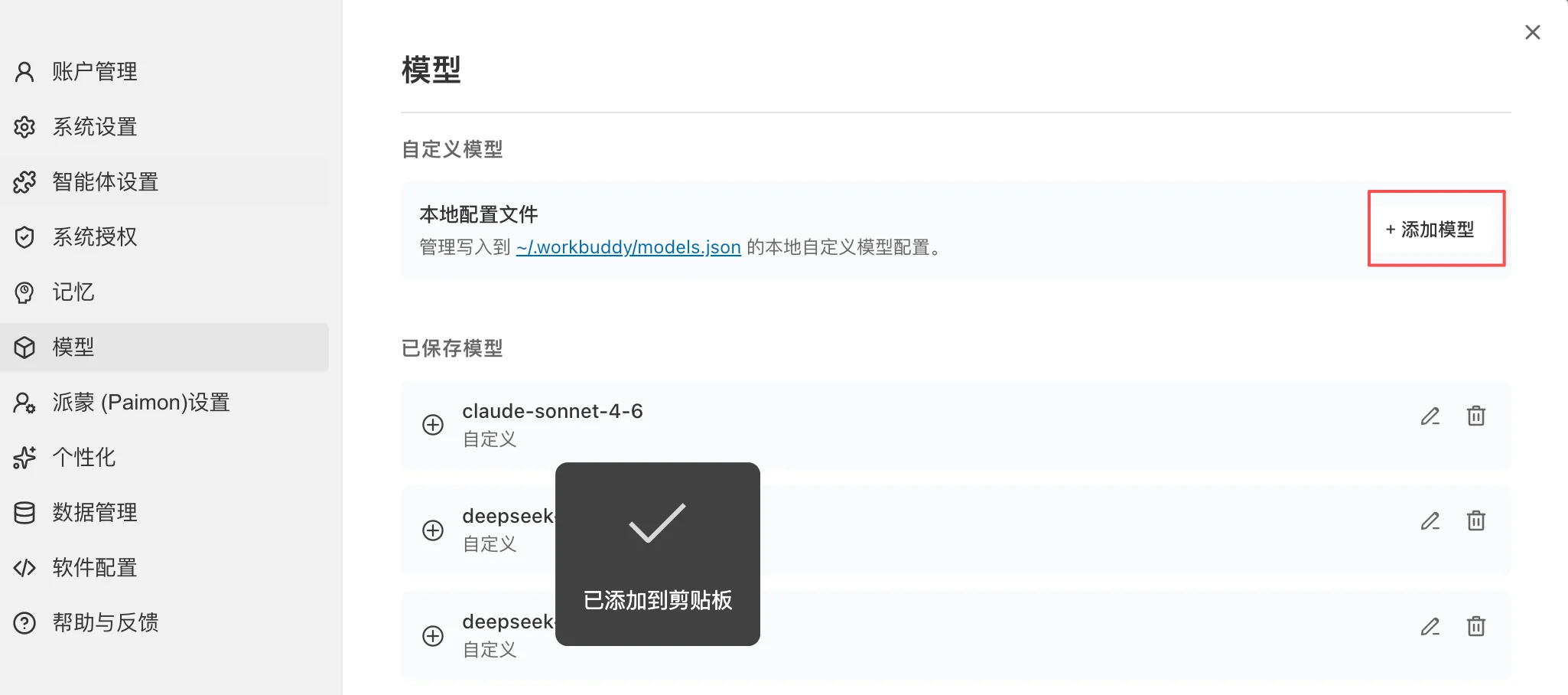
1. Navigate to Model Configuration

  1. Open WorkBuddy
  2. Click your avatar in the bottom-left corner
  3. Go to:
Settings
  └── Model Configuration
Model Provider
  1. On the Model Management page, click:
Add Model
WorkBuddy supports:
  • OpenAI Compatible API
  • Tencent Cloud Token Plan
  • Coding Plan
  • Ollama (local models)
  • Custom API

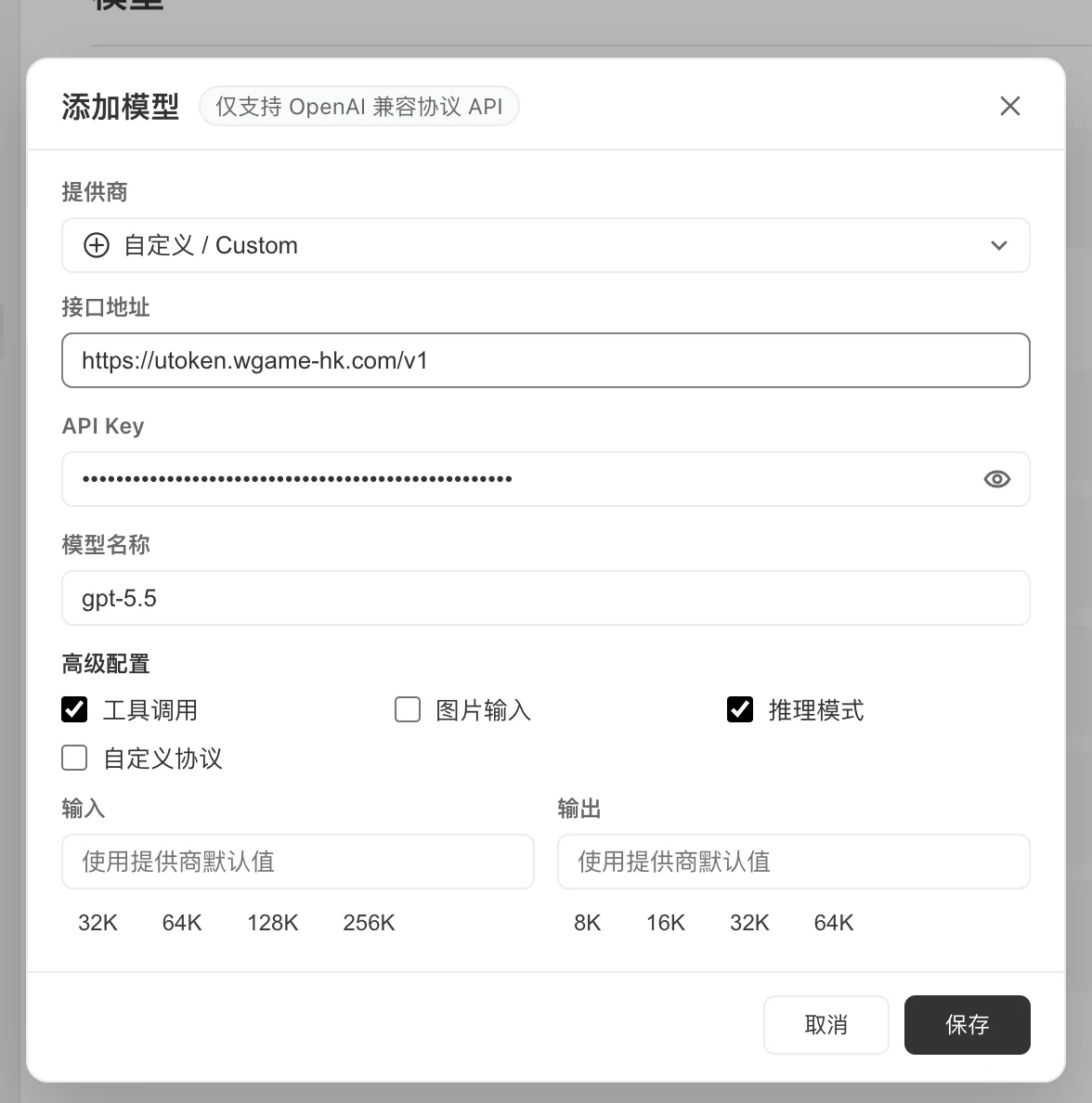
2. Create a Custom Model

Select:
Custom API
Fill in the following parameters:
FieldValue
Model Namegpt-5.5
API Keysk-xxxxxxxx
Base URLhttps://utoken.yoostudio.ai/v1
Modelgpt-5.5
Tool CallingEnabled
Vision SupportEnable based on model capability
Example:
provider: custom
base_url: https://utoken.yoostudio.ai/v1
api_key: sk-xxxxxxxx
model: gpt-5.5
Model Provider
Use CaseRecommended Model
Daily office tasksgemini-3.5-flash
In-depth researchclaude-opus-4-7
Long-form analysisclaude-opus-4-7
Data analysisgpt-5.5
Presentation generationgpt-5.5
Code developmentqwen3-coder-plus
Multimodal understandinggemini-3.5-flash
Agent tasksclaude-opus-4-7

4. Auto Mode

WorkBuddy provides an:
Auto
mode. It is recommended to specify a model explicitly in production environments to avoid result variance caused by automatic model switching across different tasks.

Core Capabilities

1. AI Office Assistant

Most common usage:
Generate my weekly work summary

Output requirements:
1. Work accomplishments
2. Risks and issues
3. Plan for next week

Keep within 1000 words
Recommended models:
gpt-5.5
claude-opus-4-7

2. In-Depth Research

WorkBuddy can autonomously:
Search for information
→ Read web pages
→ Organize findings
→ Output a research report
Example:
Research the current landscape of global AI Coding products

Focus on:
- Cursor
- Claude Code
- Gemini CLI
- OpenAI Codex

Output:
Market analysis report
Recommended model:
claude-opus-4-7

3. Data Analysis

Upload:
Excel
CSV
Database export files
Example:
Analyze this sales dataset

Output:
1. Monthly trends
2. Top 10 customers
3. Risk alerts
4. Charts
Recommended models:
gpt-5.5
gemini-3.5-flash

4. Automated Presentation Generation

Input:
Generate a presentation titled:

"2026 AI Industry Development Trends"

15 slides
Target audience: executive leadership
WorkBuddy automatically handles:
Content planning
→ Slide design
→ Chart generation
→ PPT export

5. Local File Processing

WorkBuddy can read from authorized directories:
Documents
Downloads
Projects
Example:
Organize the Downloads directory

Requirements:
- Archive images
- Archive PDFs
- Archive compressed files
- Delete duplicate files

Skills and MCP

1. Skills

WorkBuddy supports capability extension via Skills. Commonly used skills:
Web Search
Local Whisper
Office Tools
Browser Agent
Obsidian
SkillHub
Usage example:
Use the Web Search skill

Aggregate today's AI industry news
Generate a daily briefing

2. MCP Integration

Supported integrations:
GitHub
Notion
Jira
Linear
Slack
Google Drive
Enterprise internal systems
Example:
Fetch this week's Jira tasks

Output:
Project risk analysis

3. Enterprise Knowledge Base

Supported sources:
Tencent Docs
IMA Knowledge Base
Lexiang Knowledge Base
Custom MCP knowledge base
Example:
Answer employee questions based on company policies

Use Case Examples

Intelligent Operations

Task:
  Aggregate industry news

Pipeline:
  1. Search for news
  2. Categorize and organize
  3. Generate daily briefing
  4. Output as Markdown

Model:
  gemini-3.5-flash

Market Research

Task:
  AI Agent market research

Pipeline:
  1. Search for competing products
  2. Collect information
  3. SWOT analysis
  4. Compile report

Model:
  claude-opus-4-7

Development Assistant

Task:
  Refactor project codebase

Capabilities:
  - Code comprehension
  - Bug fixing
  - Unit testing
  - Documentation generation

Model:
  qwen3-coder-plus

Best Practices

1. Use Structured Task Descriptions

Recommended format:
Objective:
Generate a market analysis report

Input:
Upload industry materials

Output:
Markdown format

Requirements:
- Data accuracy
- Minimum 5000 words
- Include charts

2. Model Selection Strategy

Fast tasks:
  model: gemini-3.5-flash

Complex reasoning:
  model: claude-opus-4-7

Code development:
  model: qwen3-coder-plus

Data analysis:
  model: gpt-5.5

3. Principle of Least Privilege for File Access

Recommendation:
Grant access only to necessary directories
Avoid granting access to the entire disk.

4. Enable Skills On-Demand

Recommendation:
Install only the Skills you need

Reduces context pollution
Improves execution efficiency

Troubleshooting

Invalid API Key

Check:
Whether the API Key is correct

Whether the account balance is sufficient

Model Not Found

Check:
Whether the model name is the canonical identifier

Examples of correct values:

gpt-5.5
claude-opus-4-7

Do NOT use:

GPT 5.5
Claude Opus

Tool Calling Failure

Check:
Whether Tool Calling is enabled

Whether the model supports Function Calling

Slow Response

Recommendation:
model: gemini-3.5-flash
max_tokens: 2000
Also reduce the number of attachments.

Security Recommendations

API Key Management

Do NOT:
Hardcode keys in shared configuration files
Recommended:
Environment variables
Secret Manager

Access Control

Recommendation:
Grant access only to working directories

Avoid access to system directories

Enterprise Deployment

Recommended:
Centralized UToken gateway

Unified audit logging
Unified billing
Unified access control